local_llm is a lightweight Ruby gem that lets you talk to locally installed LLMs via Ollama — with zero cloud dependency, full developer control, and configurable defaults, including real-time streaming support. Instead of sending sensitive data to cloud APIs, this gem allows you to interact with powerful AI models directly from your local machine or server. It is built for privacy, control, and simplicity, making it ideal for developers who want fast AI features without internet dependency, usage limits, or data exposure. LocalLLM works seamlessly with both plain Ruby and Ruby on Rails applications.
It supports:
- Completely OFFLINE!
- Any Ollama model (LLaMA, Mistral, CodeLLaMA, Qwen, Phi, Gemma, etc.)
- Developer-configurable default models
- Developer-configurable Ollama API endpoint
- Developer-configurable streaming or non-streaming
- One-shot Q&A and multi-turn chat
- Works in plain Ruby & Rails
- Also safe for HIPAA, SOC2, and regulated workflows where data privacy is a big concern
- 100% local inference
- No cloud calls
- No API keys
- No data leaves your machine
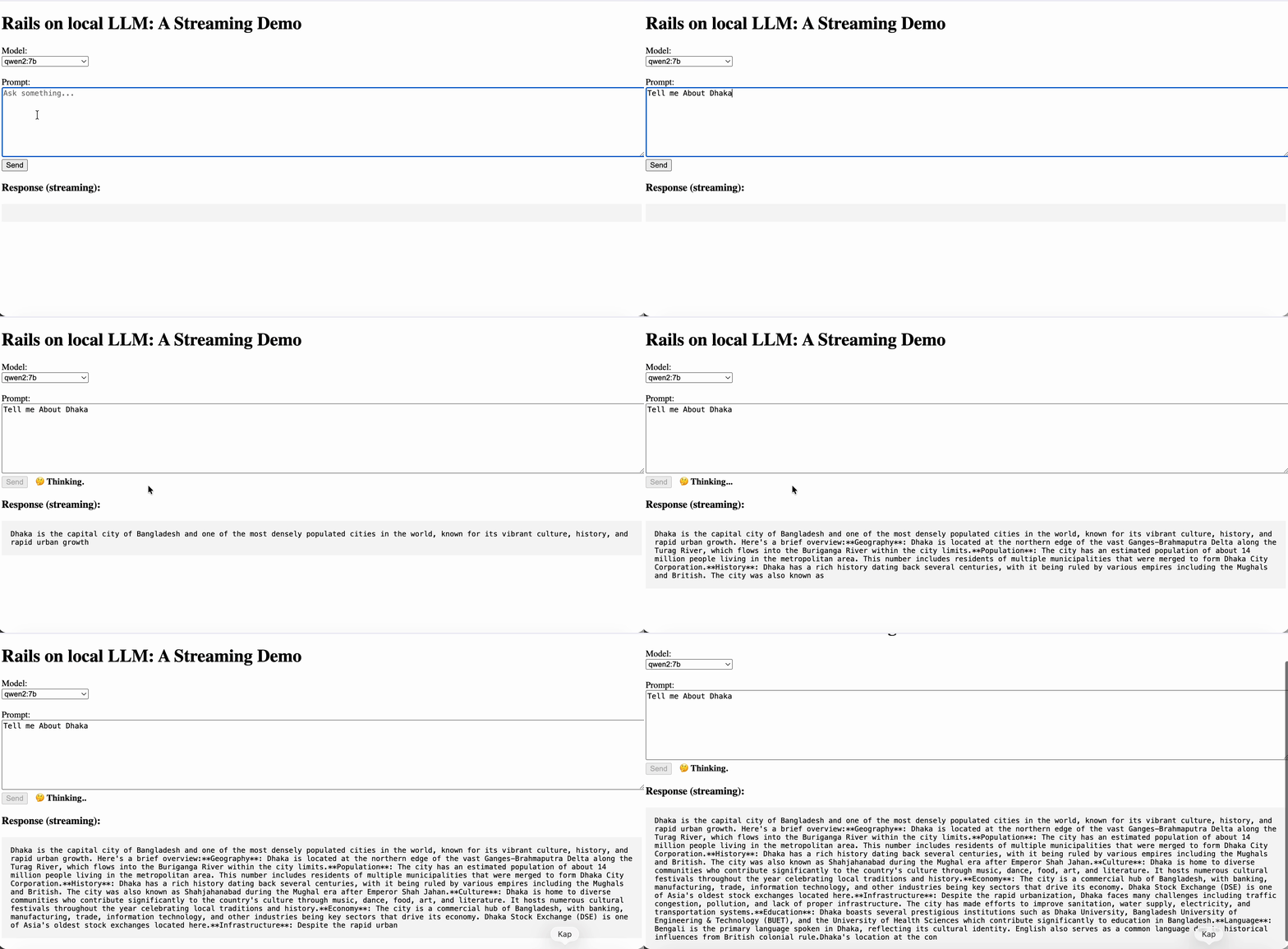
Ruby on Rails Example at https://github.com/barek2k2/local_llm_demo
- Use any locally installed Ollama model
- Change default models at runtime
- Enable or disable real-time streaming
- Works with:
llama2mistralcodellamaqwenphi- Anything supported by Ollama
- No API keys needed
- No cloud calls
- Full privacy
- Works completely offline
Download from:
Then start it:
ollama serveOr simply install it by running brew install ollama command in your mac machine.
ollama pull llama2:13b
ollama pull mistral:7b-instruct
ollama pull codellama:13b-instruct
ollama pull qwen2:7b
ollama list
LocalLlm.configure do |c|
  c.base_url = "http://localhost:11434"
  c.default_general_model = "llama2:13b"
  c.default_fast_model    = "mistral:7b-instruct"
  c.default_code_model    = "codellama:13b-instruct"
  c.default_stream = false   # true = stream by default, false = return full text
end
LocalLlm.ask("llama2:13b", "What is HIPAA?")
LocalLlm.ask("qwen2:7b", "Explain transformers in simple terms.")

LocalLlm.general("What is a Denial of Service attack?")
LocalLlm.fast("Summarize this paragraph in 3 bullet points.")
LocalLlm.code("Write a Ruby method that returns factorial of n.")
For convenience and readability, LocalLLM is provided as a direct alias of LocalLlm.
This means both constants work identically:
LocalLlm.fast("Tell me About Bangladesh")
LocalLLM.fast("Explain HIPAA in simple terms.") # alias of LocalLlm
LocalLlm.configure do |c|
  c.default_stream = true
end

LocalLlm.fast("Explain HIPAA in very simple words.") do |chunk|
  print chunk
end
LocalLlm.fast("Explain LLMs in one paragraph.", stream: true) do |chunk|
  print chunk
end

full_text = LocalLlm.fast("Explain DoS attacks briefly.", stream: false)
puts full_text
LocalLlm.models
ollama pull qwen2:7b
LocalLlm.ask("qwen2:7b", "Explain HIPAA in simple terms.")
LocalLlm.chat("qwen2:7b", [
  { "role" => "system", "content" => "You are a helpful assistant." },
  {"role" => "user", "content" => "Explain Ruby shortly in one sentence"},
])
Ruby is a dynamic, open-source programming language known for its simplicity and readability, designed for building web applications with the Ruby on Rails framework.
LocalLlm.chat("qwen2:7b", [
  { "role" => "system", "content" => "You are a helpful assistant." },
  {"role" => "user", "content" => "Explain Ruby shortly in one sentence"},
  { "role" => "assistant",   "content" => "Ruby is an open-source, dynamic, object-oriented programming language that emphasizes simplicity and readability, making it popular for web development with the Rails framework" },
  { "role" => "user",   "content" => "Tell me the year in number when it was created?" }
])
Ruby was created in the year 1995.
LocalLlm.chat("qwen2:7b", [
  { "role" => "system", "content" => "You are a helpful assistant." },
  {"role" => "user", "content" => "Explain Ruby shortly in one sentence"},
  { "role" => "assistant",   "content" => "Ruby is an open-source, dynamic, object-oriented programming language that emphasizes simplicity and readability, making it popular for web development with the Rails framework" },
  { "role" => "user",   "content" => "Tell me the year in number when it was created?" },
  { "role" => "assistant",   "content" => "Ruby was created in the year 1995." },
  {"role" => "user", "content" => "Thanks so much!"}
])
You're welcome! If you have any other questions, feel free to ask. Happy coding!
LocalLlm.configure do |c|
  c.default_general_model = "qwen2:7b"
end

LocalLlm.general("Explain transformers.")
LocalLlm.configure do |c|
  c.base_url = "http://192.168.1.100:11434"
end
Connection refused - connect(2) for "localhost" port 11434 (Errno::ECONNREFUSED)
This means ollama is not installed or not running in your machine. So run the following commands below
brew install ollamabrew services start ollama
After successfully starting this, it would run on port 11434 intom your machine. make sure it pulls installed LLM by running ollama list
- In your Gemfile, add the gem as
gem "local_llm", "~> 0.1.1" - Run
bundle install - Create an initializer at
config/initializers/local_llm.rb - Put the following code into it
LocalLlm.configure do |c|
 # Default Ollama endpoint
 c.base_url = "http://localhost:11434"

 # Choose your default models (must be installed in Ollama)
 c.default_general_model = "qwen2:7b"
 c.default_fast_model    = "mistral:7b-instruct"
 c.default_code_model    = "codellama:13b-instruct"
 c.default_stream = true # stream support by default
end
- Then from your any controller or model, run this
question = "What is Ruby?"
LocalLlm.fast(question) do |chunk|
  print chunk
end