
- Swift 3
VIPCodeGenerator uses Config.plist file for getting configuration values.
Config is declared as follows:
public struct Config {
    public let name: String
    public let author: String // who owns the project
    public let date: String
    public let projectName: String
    public let creator: String // who created the file
}
Use the GeneratorConfig dictionary to add values.
<key>GeneratorConfig</key>
<dict>
<key>Name</key>
<string>__NAME__</string>
<key>Author</key>
<string>__AUTHOR__</string>
<key>Date</key>
<string></string>
<key>Project name</key>
<string>__PROJECT_NAME__</string>
<key>Creator</key>
<string>__CREATOR__</string>
</dict>
Note:
Nameis the name of a scene you create.
Note: if
Datestring is empty, generator will use current date as default.
Please, note, that VIPCodeGenerator is being run via command line tools (generate.sh script handles it). It uses args[1] as the path where /Pattern and /Output folders are located (these ones can actually have other names).
VIPCodeGenerator uses patterns with the following identifiers:
public struct PatternFile {
    static let viewController = "__NAME__ViewController.swift"
    static let interactor = "__NAME__Interactor.swift"
    static let presenter = "__NAME__Presenter.swift"
    static let model = "__NAME__Model.swift"
    static let configurator = "__NAME__Configurator.swift"
    static let router = "__NAME__Router.swift"
}
Standard ones are located in the /Pattern folder. You can change these by changing the patterns' path in Config.plist.
	<key>Pattern path</key>
<string>Pattern</string>Generated code is generally expected to be generated within /Output folder but you can easily change that path.
-----Desktop
----VIPCodeGenerator
---Source
--Output
-`__NAME__`
This is how VIP scene generally looks like:
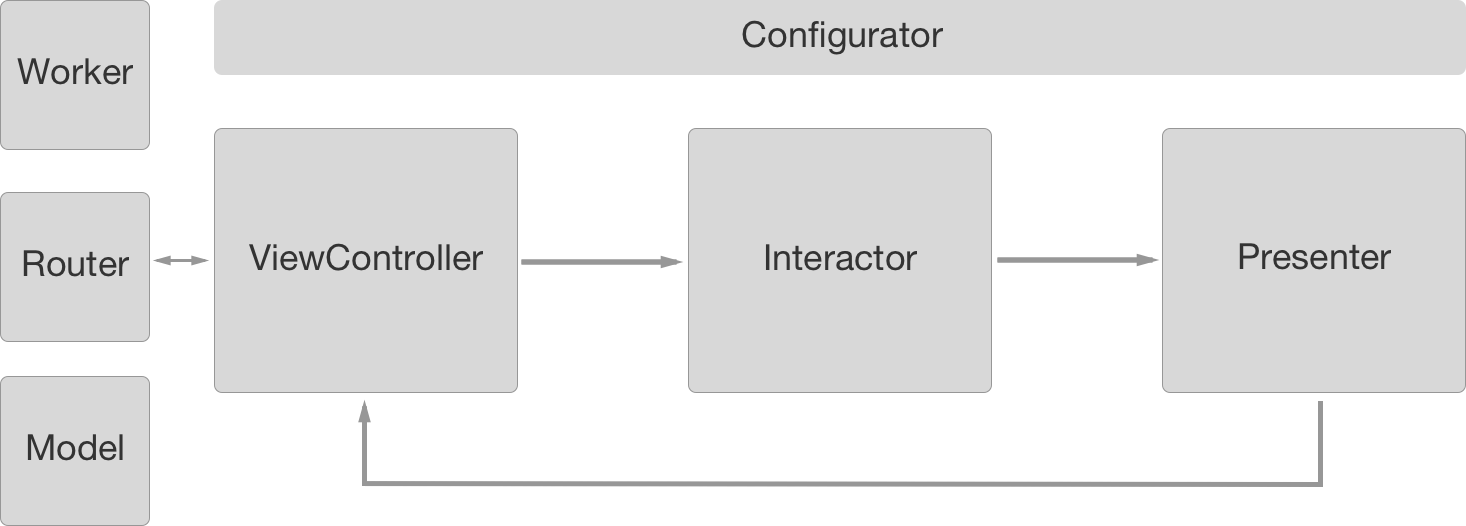
To generate the code all you have to do is to run a script generate.sh that is located within Source folder. Nothing more. ;]
- For help & feedback please use issues.
- Got a new feature? Please submit a pull request.
- Email us with urgent queries.
VIPCodeGenerator is available under the MIT license, see the LICENSE file for more information.