


The community-driven SDR software for RTL-SDR, HackRF, LimeSDR, AirSpy, PlutoSDR, USRP and more. Features advanced FM broadcasting analysis, MPX spectrum visualization, frequency scanning, and comprehensive signal processing capabilities.

SDR++ Community Edition is a community-driven fork of the original SDR++ - a cross-platform and open source SDR software with the aim of being bloat free and simple to use.
🎵 Broadcasting Analysis:
- Real-time FM MPX spectrum analysis with professional visualization
- RDS decoding and stereo L/R channel analysis
- Radio broadcasting signal monitoring and analysis
📡 Hardware Compatibility:
- RTL-SDR dongles (R820T, R828D, RTL2832U)
- HackRF One software-defined radio
- LimeSDR Mini/USB high-performance SDR
- AirSpy R2/Mini receivers
- PlutoSDR (Analog Devices ADALM-PLUTO)
- USRP devices and many more...
🔧 Advanced Features:
- Spectrum analyzer with waterfall display
- Professional frequency scanner with frequency manager integration, band support, and automatic tuning profiles
- Frequency manager with per-entry tuning profiles and band definitions
- Digital mode decoding (ADS-B, AIS, APRS, M17, POCSAG)
- Amateur radio and ham radio applications
- Satellite tracking and radio astronomy support
Revolutionary Discrete Recording System + The Ultimate Scanner Experience
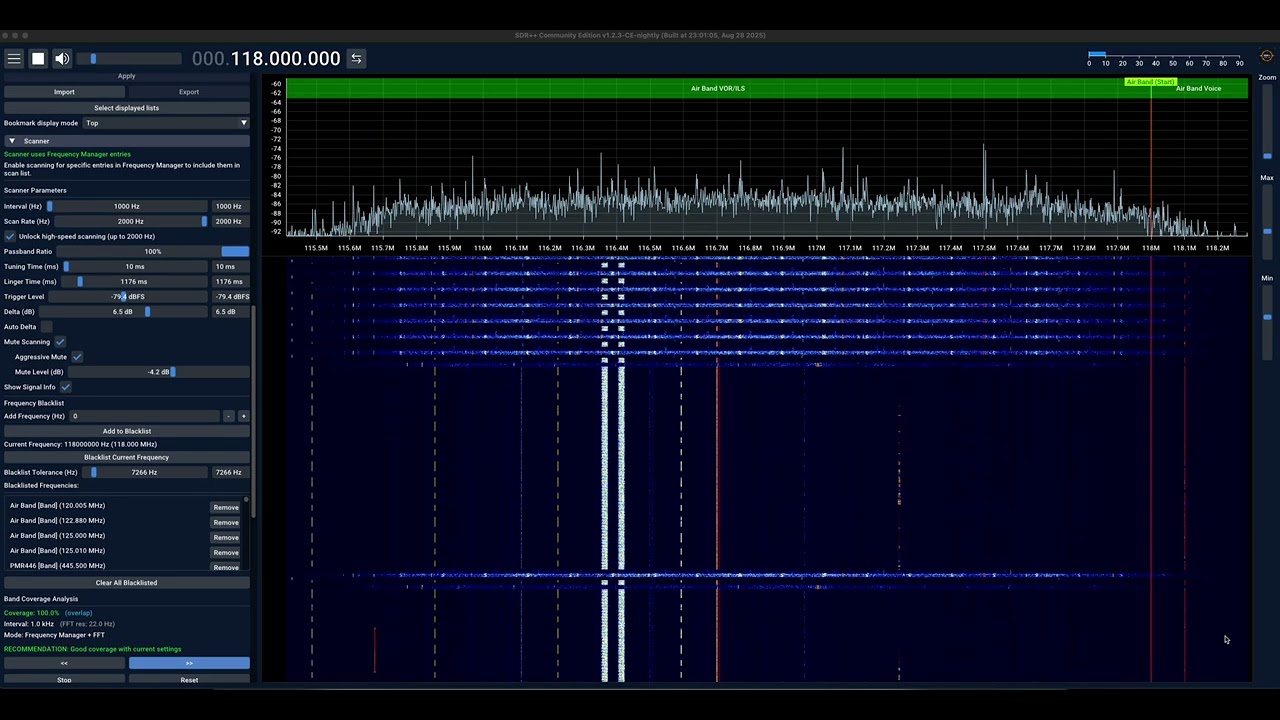
This groundbreaking release introduces automated frequency discovery and recording alongside the most advanced scanning capabilities available:
🎙️ NEW: Discrete Audio Recording System (v1.2.5-CE)
Feature requested by @Axpelle - transforming frequency scanning into automated discovery
- Automated File Splitting: Recordings automatically break into discrete files based on scanner linger time
- Intelligent Filename Generation: Files include frequency, timestamp, mode, and sequence numbers
- Smart Organization: Single-folder structure with dates embedded in filenames (e.g.,
2025-09-03_14-30-15_162550000_WFM_001.wav) - Minimum Duration Filtering: Configurable threshold eliminates short noise recordings
- Real-Time Status Display: Live recording indicator with frequency and duration tracking
- Files Today Counter: Track daily recording activity with automatic midnight reset
🚀Signal Detection (Enhanced in v1.2.5-CE)
- Zoom-Independent Detection: 43x better frequency resolution (43.9Hz vs 1.5kHz bins) using raw FFT data
- Advanced Signal Centering: Intelligent plateau detection for wide signals with center-of-mass calculation
- Real-Time Signal Analysis: Live VFO tooltips showing signal strength (dBFS) and SNR with 50ms refresh
- Hardware-Optimized: Works flawlessly across all zoom levels and hardware configurations
🔇 Professional Audio Control (NEW)
- Mute While Scanning: Eliminates noise bursts during frequency sweeps with automatic restoration
- Configurable Aggressive Mute: User-controllable enhanced mute system (-10.0 to 0.0 dB threshold)
- Operation-Level Protection: 5ms pre-emptive mute before frequency changes and demodulator switching
🎯 Enhanced Hardware Integration (v1.2.5-CE)
- SDRPlay Default Support: Now enabled by default across all platforms (Windows, macOS, Linux, Android)
- PlutoSDR Manual IP Configuration: Connect to devices with custom IP addresses on local networks
- SoapySDR macOS Support: Native integration for expanded hardware compatibility on macOS
- RTL-SDR AGC Auto-Management: Automatic AGC disable for external gain control compatibility
- RF Gain Profile Migration: Auto-converts legacy profiles with intelligent defaults
- Cross-Platform Build Stability: Resolved Android compilation issues and improved reliability
🌊 FFT/Waterfall Enhancements (NEW)
- Auto-Range Feature: Smart auto-ranging for optimal FFT/waterfall display levels
- Parks-McClellan DSP: Superior filter response across all decimation ratios (2x to 128x)
- Enhanced UI: Professional controls with improved visual feedback
📡 Legacy Scanner Features (Enhanced)
- Complete Frequency Manager Integration: Automatic scan list generation with enhanced blacklist management
- Per-Entry Tuning Profiles: Automated radio configuration for each frequency entry
- Configurable Frequency Bands: Custom step intervals with discovery scanning across defined ranges
- Adaptive Signal Detection: Narrow window for single frequencies, full bandwidth for bands
⚡ Performance & Efficiency
- Hardware-Optimized: Maximum efficiency on RTL-SDR, HackRF, LimeSDR, AirSpy, PlutoSDR
- Cross-Platform: Identical performance on Windows, macOS, Linux, and Android
- Real-Time Processing: Sub-second response time with <100Hz accuracy during signal tracking
- Memory Efficient: Intelligent buffering and thread-safe operation
🎛️ Professional Interface
- Independent Parameter Controls: Discrete controls with optimized defaults
- Real-Time Feedback: Comprehensive tooltips with technical guidance
- Streamlined Workflow: Double-click editing for frequency manager bookmarks
- Cross-Platform Consistency: Identical experience across all supported platforms
🔧 Cross-Platform Compatibility
- Windows MSVC compilation fixes
- Linux GCC and Debian compatibility improvements
- Enhanced macOS support with proper app bundle creation
📦 Download: Release v1.2.5-CE
🎯 Perfect for:
- Automated Spectrum Monitoring: Unattended frequency discovery and logging
- Professional Signal Analysis: Discrete recordings with metadata for analysis
- Amateur Radio Exploration: Discover active frequencies across bands
- Research Applications: Long-term spectrum surveillance and documentation
This Community Edition exists to address the gap in community contributions and feature development. While the original SDR++ project has established a solid foundation, many valuable user-requested features and improvements have remained unaddressed due to restrictive contribution policies.
Our commitment:
- ✅ Welcome ALL contributors - from beginners to experts
- ✅ AI-enhanced development friendly - we embrace modern development tools
- ✅ Rapid feature development - addressing user requests that matter
- ✅ Transparent review process - all contributions are reviewed fairly
- ✅ Community-driven priorities - features requested by users, built by the community
- MPX Analysis for FM Broadcasting - Real-time multiplex signal analysis with frequency spectrum visualization
- Enhanced Scanner Module - Frequency blacklisting and persistent configuration settings
- FFT Zoom Persistence - FFT zoom level and centering now persist between app restarts
- Enhanced Configuration Management - Improved settings persistence and architecture
- Build System Improvements - Better macOS support and ARM compatibility
- Comprehensive Documentation - Architecture guidelines for contributors
We actively encourage contributions! Whether you're fixing bugs, adding features, improving documentation, or enhancing the user experience - your contribution is welcome.
How to contribute:
- Fork this repository
- Create a feature branch
- Make your improvements
- Submit a pull request
- Engage in the review process
No contribution is too small - from typo fixes to major features, we value all community input.
- 🏠 Project Home: SDRPlusPlus_CommunityEdition
- 📞 Community Support: Issues & Discussions
- 📖 Contributing Guide: contributing.md
SDR++CE provides comprehensive documentation for developers, from newcomers to experts:
- 📖 Developer Wiki - Complete development documentation
- 🏗️ Architecture Guide - Understand the system design
- 🔧 Development Setup - Get your environment ready
- 🧩 Module Development - Create plugins and extensions
- 🚀 AI-Assisted Development - Cursor IDE integration and AI workflows
- Pre-configured
.cursorrules- Context-aware AI assistance for SDR/DSP development - Intelligent code generation - AI that understands real-time constraints and threading
- ⚡ Signal Path & DSP - Real-time signal processing pipeline
- 🎛️ UI System - ImGui integration and custom widgets
- 🏛️ Core Architecture - Threading model and system internals
New to SDR development? Start with the Architecture Overview to understand the big picture, then dive into Module Development for hands-on learning.
- Multi VFO
- Wide hardware support (both through SoapySDR and dedicated modules)
- SIMD accelerated DSP
- Cross-platform (Windows, Linux, MacOS and BSD)
- Full waterfall update when possible. Makes browsing signals easier and more pleasant
- Modular design (easily write your own plugins)
- NEW: MPX Analysis - Real-time FM broadcast multiplex signal analysis with frequency spectrum visualization
- NEW: Enhanced Scanner - Frequency blacklisting and persistent configuration settings
- NEW: FFT Zoom Persistence - FFT zoom level and centering settings persist between restarts
SDR++ Community Edition releases include the latest community-contributed features and improvements. Download the latest release from the Community Edition Releases page.
SDR++ Community Edition maintains full compatibility with existing configurations and plugins, making migration effortless.
Download the latest release from the Community Edition Releases page and extract to the directory of your choice.
To create a desktop shortcut, rightclick the exe and select Send to -> Desktop (create shortcut), then, rename the shortcut on the desktop to whatever you want.
Download the latest release from the Community Edition Releases page and extract to the directory of your choice.
Then, use apt to install it:
sudo apt install path/to/the/sdrpp_debian_amd64.debIMPORTANT: You must install the drivers for your SDR. Follow instructions from your manufacturer as to how to do this on your particular distro.
yay -S sdrpp-gitNote: For the most up-to-date features, we recommend downloading from our Community Edition Releases.
There are currently no existing packages for other distributions, for these systems you'll have to build from source.
Download the latest macOS app bundle from Community Edition Releases.
macOS may show a "corrupted" or "damaged" warning for unsigned apps. This is normal! The app is safe.
To bypass this security warning:
- Right-click the
SDR++.appfile → "Open" - Click "Open" in the security dialog
- The app will launch and be trusted permanently
Alternative (Terminal):
sudo xattr -rd com.apple.quarantine /path/to/SDR++.appThere are currently no BSD packages, refer to Building on Linux / BSD for instructions on building from source.
The preferred IDE is VS Code in order to have similar development experience across platforms and to build with CMake using the command line.
- Install cmake
- Install vcpkg
- Run
vcpkg/vcpkg install fftw3:x64-windows glfw3:x64-windows portaudio:x64-windows zstd:x64-windows libusb:x64-windows - Install OpenGL
mkdir build
cd build
cmake .. "-DCMAKE_TOOLCHAIN_FILE=C:/tools/vcpkg/scripts/buildsystems/vcpkg.cmake" -DMSVC_RUNTIME=dynamic
cmake --build . --config Release
If you wish to install SDR++ Community Edition, skip to the next step
You will first need to edit the Root Directory field in the config menu to point to the root_dev folder.
You will also need to copy the following modules that don't build as plugins to the root_dev/modules folder:
audio_sink
Note: Skip this step if you're running for development (using the root_dev folder).
In the build directory, run:
cmake --install . --config Release
Duplicate the build_options.txt file into a new file called build_options.local.txt and edit to your needs.
Here are additional modules that you can enable in your build_options.local.txt:
OPT_BUILD_AIRSPY_SOURCE- For Airspy devicesOPT_BUILD_AIRSPYHF_SOURCE- For Airspy HF+ devicesOPT_BUILD_BLADERF_SOURCE- For BladeRF devicesOPT_BUILD_LIMESDR_SOURCE- For LimeSDR devicesOPT_BUILD_PERSEUS_SOURCE- For Perseus devicesOPT_BUILD_PLUTOSDR_SOURCE- For PlutoSDR devicesOPT_BUILD_HACKRF_SOURCE- For HackRF devicesOPT_BUILD_RTL_TCP_SOURCE- For connecting to rtl_tcp instancesOPT_BUILD_SDRPP_SERVER_SOURCE- For connecting to other SDR++ instances remotelyOPT_BUILD_SPYSERVER_SOURCE- For connecting to SpyServer instancesOPT_BUILD_SOAPY_SOURCE- For SoapySDR devices (Note: Code generation in active development)
Note: This guide was written for Ubuntu 22. Some distributions may have older versions of packages that will not work. If so, compile from source and install newer versions.
build-essentialcmakepkg-configlibfftw3-devlibglfw3-devlibvolk2-dev(Ubuntu 22+) orlibvolk1-dev(Ubuntu 20)libzstd-dev
libairspy-dev- For Airspy deviceslibairspyhf-dev- For Airspy HF+ deviceslibbladerf-dev- For BladeRF deviceslibiio-dev libad9361-dev- For PlutoSDR deviceslibhackrf-dev- For HackRF deviceslibrtaudio-dev- For audio sinklibusb-1.0-0-dev- For Perseus, BladeRFlibjsoncpp-dev- For some digital decoderslibcodec2-dev- For M17 digital decoder
Note: make sure you're using libvolk2-dev, NOT libvolk1-dev as the latter will cause a crash
mkdir build
cd build
cmake .. -DCMAKE_BUILD_TYPE=Release
make -j2
You can specify more build options by adding the options listed in build_options.txt to the cmake command as such:
cmake .. -DCMAKE_BUILD_TYPE=Release -DOPT_BUILD_BLADERF_SOURCE=ON -DOPT_BUILD_LIMESDR_SOURCE=ON -DOPT_BUILD_SDRPP_SERVER_SOURCE=ON
Alternatively, to enable all available modules for your distribution:
cmake .. -DCMAKE_BUILD_TYPE=Release -DOPT_OVERRIDE_BUILD_OPTIONS=ON
For macOS with ARM CPUs, add:
cmake .. -DCMAKE_BUILD_TYPE=Release -DCMAKE_OSX_DEPLOYMENT_TARGET=10.15 -DUSE_BUNDLE_DEFAULTS=ON
To install SDR++ Community Edition run the following command in your build folder:
sudo make install
The installation will by default be /usr for packaging purpses, you can specify a custom directory with:
sudo make install DESTDIR=/usr/local
To build a .deb package, run:
make package
brew tap pothosware/homebrew-pothos
brew install portaudio fftw glfw airspy airspyhf hackrf rtl-sdr libbladerf codec2 zstd autoconf automake libtool && brew install --HEAD volk
You may also want to install the limesuite package from pothos for LimeSDR support.
mkdir build
cd build
cmake .. -DCMAKE_BUILD_TYPE=Release -DCMAKE_OSX_DEPLOYMENT_TARGET=10.15 -DUSE_BUNDLE_DEFAULTS=ON
make -j4
Or, if you want to use MacPorts to install dependencies:
sudo port install fftw-3 +universal glfw +universal volk +universal zstd +universal autoconf automake libtool
mkdir build
cd build
cmake .. -DCMAKE_BUILD_TYPE=Release -DCMAKE_OSX_DEPLOYMENT_TARGET=10.15 -DUSE_BUNDLE_DEFAULTS=ON -DCMAKE_PREFIX_PATH=/opt/local
make
Using homebrew dependencies seems to work fine for most modules, but on Macs with Apple Silicon SoapySDR crashes SDR++ pretty hard...
Note: This process is only available on macOS
First, build the project:
make -j8Then, from the project root directory (not build directory), create the app bundle:
cd ..
./make_macos_bundle.sh build ./SDR++CE.app
This will create a SDR++CE.app bundle in your project root directory that you can launch with:
open SDR++CE.appFor detailed instructions, see MACOS_BUILD_INSTRUCTIONS.md.
Not all modules are built by default. I decided to disable the build of those with large dependencies or that are still in beta. Modules in beta are still included in releases for the most part but not enabled in the cmake file.
The signal_path module is not optional and always included.
| Name | Stage | Dependencies | Option | Built by default |
|---|---|---|---|---|
| airspy_source | Working | libairspy | OPT_BUILD_AIRSPY_SOURCE | false |
| airspyhf_source | Working | libairspyhf | OPT_BUILD_AIRSPYHF_SOURCE | false |
| audio_source | Working | portaudio | OPT_BUILD_AUDIO_SOURCE | true |
| bladerf_source | Working | libbladeRF | OPT_BUILD_BLADERF_SOURCE | false |
| file_source | Working | - | OPT_BUILD_FILE_SOURCE | true |
| hackrf_source | Working | libhackrf | OPT_BUILD_HACKRF_SOURCE | false |
| hermes_source | Working | - | OPT_BUILD_HERMES_SOURCE | false |
| limesdr_source | Working | libLimeSuite | OPT_BUILD_LIMESDR_SOURCE | false |
| network_source | Working | - | OPT_BUILD_NETWORK_SOURCE | true |
| perseus_source | Working | libperseus-sdr | OPT_BUILD_PERSEUS_SOURCE | false |
| plutosdr_source | Working | libiio, libad9361 | OPT_BUILD_PLUTOSDR_SOURCE | false |
| rfspace_source | Working | - | OPT_BUILD_RFSPACE_SOURCE | false |
| rtl_sdr_source | Working | librtlsdr | OPT_BUILD_RTL_SDR_SOURCE | true |
| rtl_tcp_source | Working | - | OPT_BUILD_RTL_TCP_SOURCE | true |
| sdrplay_source | Unfinished | SDRplay API | OPT_BUILD_SDRPLAY_SOURCE | false |
| sdrpp_server_source | Working | - | OPT_BUILD_SDRPP_SERVER_SOURCE | true |
| soapy_source | Working | soapysdr | OPT_BUILD_SOAPY_SOURCE | false |
| spyserver_source | Working | - | OPT_BUILD_SPYSERVER_SOURCE | true |
| spectran_http_source | Working | - | OPT_BUILD_SPECTRAN_HTTP_SOURCE | false |
| Name | Stage | Dependencies | Option | Built by default |
|---|---|---|---|---|
| audio_sink | Working | portaudio | OPT_BUILD_AUDIO_SINK | true |
| network_sink | Working | - | OPT_BUILD_NETWORK_SINK | true |
| new_portaudio_sink | Beta | portaudio | OPT_BUILD_NEW_PORTAUDIO_SINK | false |
| Name | Stage | Dependencies | Option | Built by default |
|---|---|---|---|---|
| atv_decoder | Unfinished | - | OPT_BUILD_ATV_DECODER | false |
| falcon9_decoder | Working | ffplay | OPT_BUILD_FALCON9_DECODER | false |
| kg_sstv_decoder | Working | - | OPT_BUILD_KG_SSTV_DECODER | false |
| m17_decoder | Working | codec2 | OPT_BUILD_M17_DECODER | false |
| meteor_demodulator | Working | - | OPT_BUILD_METEOR_DEMODULATOR | true |
| pager_decoder | Working | - | OPT_BUILD_PAGER_DECODER | false |
| radio | Working | - | OPT_BUILD_RADIO | true |
| vor_receiver | Beta | - | OPT_BUILD_VOR_RECEIVER | false |
| weather_sat_decoder | Working | - | OPT_BUILD_WEATHER_SAT_DECODER | false |
| Name | Stage | Dependencies | Option | Built by default |
|---|---|---|---|---|
| discord_integration | Working | - | OPT_BUILD_DISCORD_INTEGRATION | false |
| frequency_manager | Working | - | OPT_BUILD_FREQUENCY_MANAGER | true |
| iq_exporter | Working | - | OPT_BUILD_IQ_EXPORTER | false |
| recorder | Working | - | OPT_BUILD_RECORDER | true |
| rigctl_client | Working | - | OPT_BUILD_RIGCTL_CLIENT | false |
| rigctl_server | Working | - | OPT_BUILD_RIGCTL_SERVER | false |
| scanner | Working | - | OPT_BUILD_SCANNER | true |
First, please make sure you're running the latest automated build. If your issue is linked to a bug it is likely that is has already been fixed in later releases
You might see this error if you're using a 64 bit machine but didn't install the visual C++ redistributable x64 version.
If SDR++ Community Edition crashes with an "Illegal instruction" error, this is due to your CPU being too old to support SIMD instructions that speed up SDR++.
You can get around this by editing config.json (~/.config/sdrpp/config.json on Linux) and changing fastFFT to false and bufferSize to 262144.
This isn't great however as it will slow down SDR++ Community Edition quite significantly.
This is usually caused by the graphics drivers not being properly installed. This can happen when using a headless/server version of Linux distributions. Install graphics drivers or enable headless mode by adding -s to the command line arguments.
If you see this error, you're trying to use a feature that hasn't been implemented for the particular SDR you're using. Check the modules list above to see which modules support the feature you're trying to use.
You can switch to a different source using the dropdown menu in the source selection widget.
This is a CPU usage issue. The default buffer size is too small for the Pi's limited processing power.
Edit config.json and change the bufferSize value to 4096000.
The HackRF has the annoying tendency to have a DC offset spike. You can avoid this by activating the "Offset Tuning" option in the source settings.
We warmly welcome ALL contributors! Your ideas, improvements, and feedback help make SDR++ Community Edition better for everyone.
Report issues or suggest features:
- Use our GitHub Issues to report bugs or request features
- Join discussions in our Community Forum
Code contributions:
- New SDR devices: Create source plugins - our modular design makes this straightforward
- Demodulators: Add to the radio module or create decoder modules
- UI enhancements: We welcome both functional improvements and visual enhancements
- Core features: Architectural improvements and new capabilities are always appreciated
Unlike restrictive projects, we embrace UI/UX improvements! Beautiful, intuitive interfaces make SDR more accessible to everyone.
Code quality:
- Run
clang-formaton your changes for consistency - We'll help you with any formatting issues during review
SDR++ Community Edition uses CMake for compilation and vcpkg for dependency management on Windows.
📚 For comprehensive setup instructions, see our Development Setup Guide which covers all platforms with detailed instructions and troubleshooting.
Install dependencies:
vcpkg/vcpkg install fftw3:x64-windows glfw3:x64-windows portaudio:x64-windows zstd:x64-windows libusb:x64-windows
Install dependencies:
sudo apt install build-essential cmake git pkg-config libfftw3-dev libglfw3-dev libvolk2-dev libzstd-dev librtaudio-dev libusb-1.0-0-dev libjsoncpp-dev libcodec2-dev
Note: Some older distributions don't have libvolk2-dev. Use libvolk1-dev instead.
SDR++ Community Edition uses CMake, which allows for easy cross-platform compilation. Some modules are platform-specific. For example, the "audio_sink" module uses the portaudio library, which may not be available on all systems.
You can easily disable unneeded modules using the build options described above.
📚 For complete module development guidance, see our Module Development Guide with step-by-step tutorials, working examples, and best practices.
Quick start:
- Follow our Module Quick Start for experienced developers
- Use AI-Assisted Development with Cursor IDE for intelligent code generation
- Study the Module System Overview to understand the architecture
Traditional approach:
To create a new module, start by copying the "demo_module" folder and rename it to whatever you like.
You will need to edit the CMakeLists.txt to change the module name. The module name should be the name of the folder.
For guidance, check the existing modules and our comprehensive wiki documentation above.
Ready to dive deeper? Core contributions help shape the fundamental architecture and capabilities of SDR++ Community Edition.
📚 Essential reading for core development:
- Core Architecture - Threading model and system design
- Core Internals - Implementation details and module loading
- Signal Path & DSP - Real-time processing pipeline
- Backend Architecture - Platform-specific implementations
Getting started with core development:
- Start with the Architecture Overview to understand the big picture
- Use AI-Assisted Development for context-aware coding assistance
- Follow our Development Setup guide
- Check our MACOS_BUILD_INSTRUCTIONS.md for macOS-specific guidance
We welcome architectural improvements! This codebase has evolved over time, and fresh perspectives on design patterns, performance optimizations, and code organization are always valuable.
Beyond code, there are many valuable ways to support SDR++ Community Edition:
- Help fellow users in our GitHub Discussions
- Share your projects and inspire others with your SDR applications
- Write tutorials and documentation to help newcomers get started
- Test new features and provide feedback on releases
Companies integrating SDR++ Community Edition into their workflows are welcome to:
- Sponsor feature development through our community-focused development model
- Contribute specialized hardware support for your SDR devices
- Share expertise through technical documentation and best practices
The Community Edition thrives through collective collaboration - every contribution, big or small, helps build a better SDR software ecosystem for everyone.
Welcome to SDR++ Community Edition - where every contribution matters! 🚀
SDR++ Community Edition is based on the foundation of the original SDR++ project by Alexandre Rouma. This Community Edition exists to foster open collaboration and rapid feature development.